
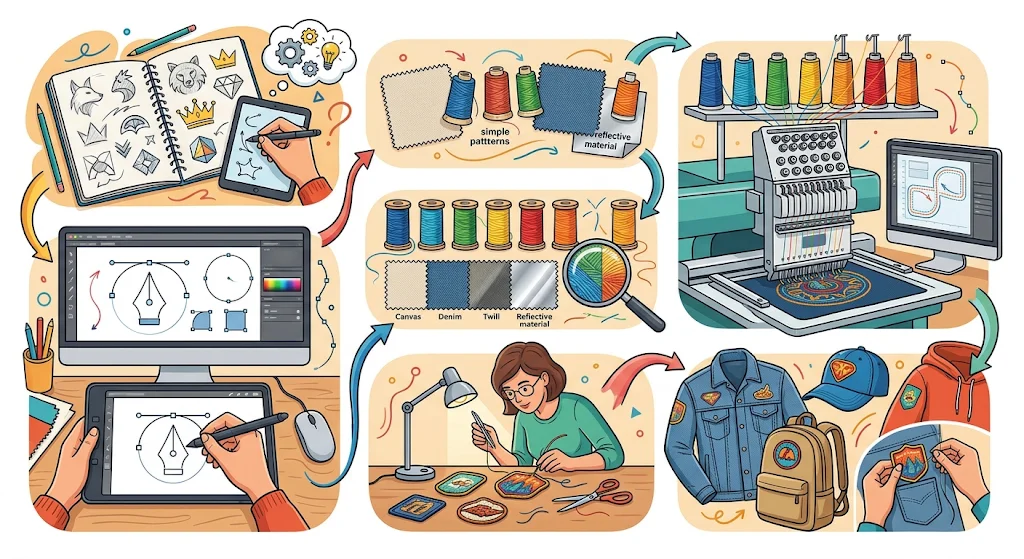
Want to design a custom embroidered patch but don’t know how? Designing Custom Embroidered Patches for your brand is easier than you might think.
Once you know the key factors to consider when designing a professional patch to represent your brand, you will realize how straightforward it is to create an effective brand patch.
This article follows the design choices in the order you’ll face them, from where the patch goes to how it attaches. You’ll also see when a different patch type suits your artwork better.
How to Design Custom Embroidered Patches Step by Step
You can design the right custom embroidered patch for your brand if you follow the step-by-step process given below.
Step 1: Decide Where the Patch Will Go
Placement is important because it sets the size, so decide the spot before you touch the artwork. The following table shows common starting sizes.
| Where it goes | Common starting size |
| Cap front | Up to 2.5 inches tall |
| Polo or button-down shirt | 1.5 to 2.5 inches wide |
| Uniform chest | 3 to 5 inches wide |
| Sleeve | 3 to 4 inches wide |
| Bag or backpack | 2.5 to 4 inches wide |
| Jacket back | 8 to 10 inches wide |
Step 2: Start With a Clean Vector Logo
Your artwork should be in a vector file because it is the right starting point for a patch. It keeps the details of your logo neat and clear, even when zoomed in. Common types are AI, EPS, SVG, and PDF.
If you have a PNG or JPG, it can work as well, but may need to be redrawn. You can just send it anyway because free design is part of what we do, so a low-quality image or a sketch is still a fine place to start.
Step 3: Simplify the Artwork for Thread
Embroidered patches carry designs stitched with threads, so strip your logo down to solid shapes with clear edges, because complicated details can get lost in the stitches.
Before a machine can stitch your artwork, it is converted into a stitch file. That step is called digitizing, and it does not quite support gradients, shadows, glow effects, and thin outlines.
A gradient might turn into flat bands of color, and a thin outline can vanish. If your logo depends on fine details, you can switch to Woven patches because they hold small details better than stitched ones.
Step 4: Make Text Big Enough to Read
Keep letters at least 0.25 inch (about 6 mm) tall. That’s a common minimum for embroidered patches to stay readable, because smaller letters blend into the thread.
Keep lines at least 0.05 inch (about 1.3 mm) thick, so they stitch fine, and choose a bold, simple font, since thin script fonts have a high chance of getting blurred easily once they are stitched.
Step 5: Choose Your Thread Colors
Use fewer thread colors and keep a strong contrast between them, since light thread on dark cloth reads clearly. Two mid-tones do not stand out well.
Thread comes in set shades, so a match to your brand color may be a close shade rather than exact. You can judge the final color from the mockup because it is close to the final look of the patch, rather than judging it from a picture.
Step 6: Pick a Border and a Shape
A border makes your patch firm and gives it a refined look. If you match the border color to the base color of the patch, it will look like one whole piece rather than a framed one.
| Border | Look | Suits |
| Merrowed | Thick, raised, classic | Circles, ovals, squares, and other simple shapes |
| Hot cut | Thin, flat, follows your outline | Custom shapes like shields or animals |
You can choose a merrowed one if your design has a simple shape, and choose hot cut if your patch follows complicated outlines.
Step 7: Choose How the Patch Attaches
Your patch backing decides how the patch attaches, and the right backing option depends on how often the garment gets washed.
| Backing | How it attaches | Trade-off |
| Iron-on | Heat melts a glue layer onto the fabric | Can peel after many washes |
| Sew-on | Thread stitched around the edge | Takes more time but stays put |
| Hook and loop | Hook side on the patch, loop side sewn to the garment | Removable, but you sew on the loop piece |
| Adhesive | Peel-and-stick | Temporary and may leave residue |
Step 8: Review the Mockup Before You Approve
You will receive a mockup that shows the size, colors, and layout of the patch. We make one free of charge. You can print it at actual size and put it on the garment to check whether it suits your garment or not. If anything dissatisfies you, ask for changes before production starts.
What Makes a Brand Patch Design Work?
1. Keep the Design Simple
Simple bold shapes and less colours read best on an embroidered patch. Every design on it is stitched with threads, which is why it can’t copy a gradient or a fine photographic detail. A sharp logo in an image can turn out blurred.
2. Choose the Right Size
The size of a patch matters because the wrong size can disrupt the patch’s layout and make the garment asymmetric. To check the patch size, cut a piece of paper to the size you have in mind and place it on the garment to see straight away whether it looks balanced or too big.
3. Keep Text Clear
Tiny letters and thin lines can get lost in the threads because of the thickness. Simple texts work well and stay readable on a completed patch. If your text is not readable on the arms length, it will blur out on the patch.
4. Pick the Right Colors
Contrast with the fabric makes the patch stand out, for example, a navy patch on a black work jacket can almost disappear. If your brand colors are dark, a lighter border around the edge helps the patch stand out,t and choosing less colours also keeps the design professional, cleaner, and easier to spot from a distance.
5. Match the Patch to Your Brand
Keep your logo, brand colors, and style symmetric so people recognize the patch as yours. Send a color reference, such as a Pantone code, with your artwork to match the thread.
What Should You Check Before Approving Your Patch Design?
When approving the mockup of your patch, keep the following things in mind.
1. Size and shape
Check the size to make sure it fits your garment, or check whether the shape looks good on the final product.
2. Spelling
If there is any text on your patch, check the spelling, names, capital letters, and apostrophes, too, because correcting them will be nearly impossible once the patches are made and will cost you a new batch.
3. Colors
Look out for the colors, are they close to the theme of your brand or away from it? If you feel like it differs slightly, ask for a revision quickly.
4. Logo details
Fine lines, tiny lettering, and soft gradients can be hard on a stitch patch. If the details on your mock-up are not readable from an arm’s distance, ask for the simplification of your design.
5. Border
Check if the border in the mockup suits your patch. Also, look out for the border color, it can blend with the garment or contrast with it, so pick what suits your brand.
6. Backing
Humans can make mistakes, from either end, so check for the backing as well, if it is the right one that you chose.
Approve the mockup only when every detail looks right to you. If something seems off, say so before you approve it.
Which Patch Type Suits Your Design?
Other than embroidery, there are more styles into which a custom patch can be made. The following table will give you an overview of other patch types you can consider.
| Patch type | Look and feel | Suits | Watch out for |
| Embroidered | Raised, textured thread | Bold logos, uniforms, caps | Fine detail gets simplified |
| Woven | Flat, tight weave, thin | Small text and detailed logos | Less texture than stitched patches |
| PVC | Soft, rubbery, molded | Rain gear and work bags | No stitched look |
| Sublimated | Printed with dye | Photos and gradients | No thread texture |
| Chenille | Fuzzy, raised yarn | Varsity letters and big shapes | Needs large, simple shapes |
How Do You Keep Your Patch Consistent Across Sizes?
Make one simplified version of your logo for each size you need, so every patch stays clear at its own size. A large version can hold the full logo, while a small version should keep only the icon and the main color.
Keep the same colors and border style on every size, so a cap patch and a jacket patch look related. The small version will drop the detail. That’s the point. Save your approved artwork and color codes, too, so a reorder starts from the same design.
How Long Does It Take to Get Custom Patches?
Turnaround is 7 to 10 days, and design and mockup are free, so you can review your patch before anything is made. There’s no minimum order, and your custom patches made in the USA ship on time, backed by our on-time shipping guarantee.
Plan your event or uniform launch around that 7 to 10 day window.
Allow extra time for mockup changes, since those happen before production starts. We also guarantee quality and no hidden charges. Ask for the full price before you approve, and you’ll know exactly what you’re paying.
Frequently Asked Questions
Can I use a JPG or PNG logo for a patch?
Yes, you can send us the design in JPG and PNG format, but it might need to be redrawn. At USA Custom Embroidered Patches, we provide a free vector conversion service, so you don’t have to worry about the extra cost.
Will the thread match my brand colors exactly?
The thread comes in set colors so that a match can be a close color. Send your brand color codes, such as Pantone numbers, and request a free mockup, then compare your design.
Can I add a photo or a gradient to an embroidered patch?
Gradients and photos do not turn out well on embroidery because of stitches, but a sublimated patch can handle them well.
How do I stop a patch from peeling off after washing?
You can sew around the edge of the patch to keep it from lifting, or press it again.
Do I have to pay for design help?
At USA Custom Embroidered Patches, design and mockup services are free, so you can send us your logo or a sketch, and we’ll turn it into a patch layout.
Can I order just a few patches to test a design?
We require no minimum order, so our customers can order a small batch to test their patches.
Final Thoughts
Now that you have read all the steps that we have lined up for your convenience, you can design your embroidered patches with ease of mind. Just choose the placement, simplify your artwork first, then pick the right size, border, and backing for how the garment gets used. If your logo still looks crowded or blurry at the size you want, changing the patch type is a better option.
Once you have designed your patch, send your logo or a rough sketch to get a free mockup, approve it if you are satisfied, and receive your patches at your doorstep.

Emma Carter